.avif)
The Easy Guide to Getting a Stacks Wallet: Leather or Xverse
Get a Stacks wallet, set it up safely, and fund it with STX, BTC, and sBTC, with the funding steps laid out in full.
Two wallets to choose from
Leather and Xverse are both free, self custody wallets (you hold your own keys), and work with Stacks (STX) and Bitcoin (BTC). They differ in platforms and features, so here is a side by side view to help you decide what fits your setup. Both are interoperable, so you can also use them together.
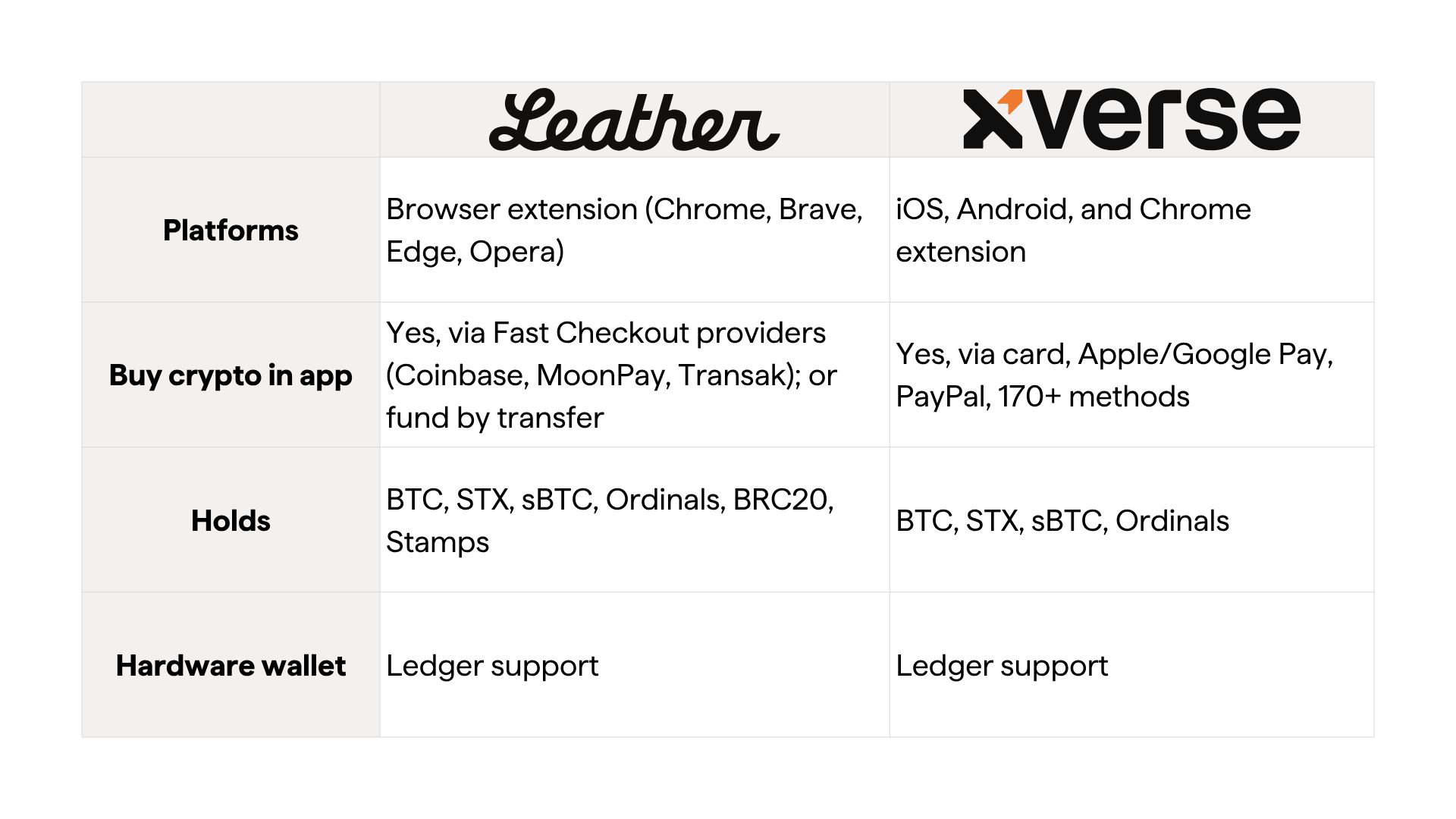
Whichever you choose, the setup and funding steps below apply to both.
Step 1: Get the wallet
One safety rule above all else: Only download from the official site. Bookmark it. Fake wallet extensions and apps are the number one way people lose funds.
- Leather official site: leather.io
- Xverse official site: xverse.app
Option A: Leather (mobile or browser extension)
- Desktop: Go to leather.io and click Install or Download. Choose your browser to reach the official extension store listing, click Add to Chrome (or Brave, Edge, Opera), then Add Extension. Pin the Leather icon to your toolbar.
- Mobile: Search "Leather Bitcoin Wallet" in the App Store or Google Play, or, more safely, tap the download links on leather.io. Confirm the developer is Leather.
Option B: Xverse (mobile or extension)
- Mobile: Search "Xverse" in the App Store or Google Play, or, more safely, tap the download links on xverse.app. Confirm the developer is Xverse.
- Desktop: On xverse.app, choose the Chrome extension and add it the same way as above.
Step 2: Set it up (and back it up properly)
The steps are nearly identical for both wallets.
- Open the wallet and choose Create a new wallet.
- The wallet shows you a secret recovery phrase (a list of words: Leather uses 24, Xverse uses 12).
- Write it down on paper, in order. Store it somewhere private. Do not screenshot it, email it, or save it in your notes app or cloud.
- Confirm the phrase when prompted, then set a password or PIN (this only unlocks the app on this device, while the recovery phrase is the real key).
- Done. You now have a Stacks wallet.
What the recovery phrase actually does:
It is your wallet. Anyone with it controls your money, and if you lose it no one can recover your funds, including Leather, Xverse, or anyone else. Treat it like the only key to a safe. Many people keep a second copy in a separate location.
Optional but recommended for larger amounts: Both wallets can connect to a Ledger hardware wallet, keeping your keys in cold storage.
Step 3: Find your addresses
Your wallet has separate addresses for different chains. Sending to the wrong one is the most common mistake. In either wallet, tap Receive and you will see:
- A Stacks (STX) address, usually starting with SP.... Use this for STX and sBTC.
- A Bitcoin (BTC) address, starting with bc1... (or similar). Use this for BTC.
Rule of thumb:
- STX and sBTC go to your Stacks address. sBTC lives on the Stacks layer, so it uses the Stacks address, not the Bitcoin one.
- BTC goes to your Bitcoin address.
Step 4: Fund it
Fund with STX
Easiest (Xverse, buy with money):
- Open Xverse, tap Buy, then choose Stacks (STX).
- Enter an amount and pick a payment method (card, Apple/Google Pay, PayPal, and more).
- Compare the aggregated providers (look for "Best Price"), confirm, and complete any ID check.
- STX usually arrives in minutes.
From an exchange (works for both wallets):
- Buy STX on an exchange that lists it.
- In your wallet, tap Receive, then Stacks (STX), and copy the SP... address.
- On the exchange, withdraw STX to that address. Send a small test amount first if you are nervous.
Leather can also buy STX in app via Fast Checkout, which sends it straight to your wallet through providers like Coinbase, MoonPay, and Transak. Or fund it by transferring STX in from an exchange or another wallet.
Fund with BTC
Buy in app (Xverse): Tap Buy, then Bitcoin, choose a payment method, and confirm.
Transfer in (both wallets):
- Tap Receive, then Bitcoin, and copy your bc1... address.
- Send BTC to it from an exchange or another wallet.
- Double check it is the Bitcoin address, not the Stacks one.
Fund with sBTC
sBTC is a token backed by Bitcoin at a 1:1 ratio that lives on the Stacks layer, so you can use your BTC inside Stacks apps (and earn yield). You get it by bridging real BTC into sBTC.
You will need: some BTC already in your wallet (see above) and your Stacks address.
- Go to the official sBTC Bridge at sbtc.stacks.co.
- Click Connect Wallet and connect Leather or Xverse.
- Choose Deposit (BTC to sBTC). Enter the BTC amount.
- Confirm your Stacks receiving address (SP...), which is where the sBTC lands.
- Sign the Bitcoin transaction in your wallet and set the BTC network fee.
- Wait for confirmation. sBTC typically arrives in about 20 minutes (1 to 2 Bitcoin confirmations).
Going the other way (sBTC to BTC) is a withdrawal on the same bridge. There are two fees on a deposit: the Bitcoin network fee you set, plus the protocol's processing fee. Both are shown before you confirm.
Quick troubleshooting
"My funds aren't showing up."
Bitcoin confirmations take time, so check the transaction on a block explorer. Also confirm you sent to the correct chain's address.
"I see two different addresses."
That is normal. One is for Bitcoin and one is for Stacks. Match the asset to the right one.
"Can I move between Leather and Xverse?"
Yes. You can also import the same wallet into both by entering your recovery phrase, but only do this on devices you trust.
"I lost my password."
Reinstall the wallet and restore with your recovery phrase. That is exactly what it is for.
The 30 second checklist
- Download only from leather.io or xverse.app
- Recovery phrase written on paper, stored offline, never screenshotted
- Password or PIN set
- Know which address is Stacks (SP…) versus Bitcoin (bc1…)
- Funded: STX (buy or transfer), BTC (buy or transfer), sBTC (bridge from BTC)
- Sent a small test amount before any large transfer
This guide is educational, not financial advice. Crypto transactions are irreversible, so double check addresses and amounts before sending.
Get more of Stacks
Get important updates about Stacks technology, projects, events, and more to your inbox.